Homepage Service
Defined in /modules/services/homepage.nix,
found in the selfhostblocks.nixosModules.homepage module.
See the manual for how to import the module in your code.
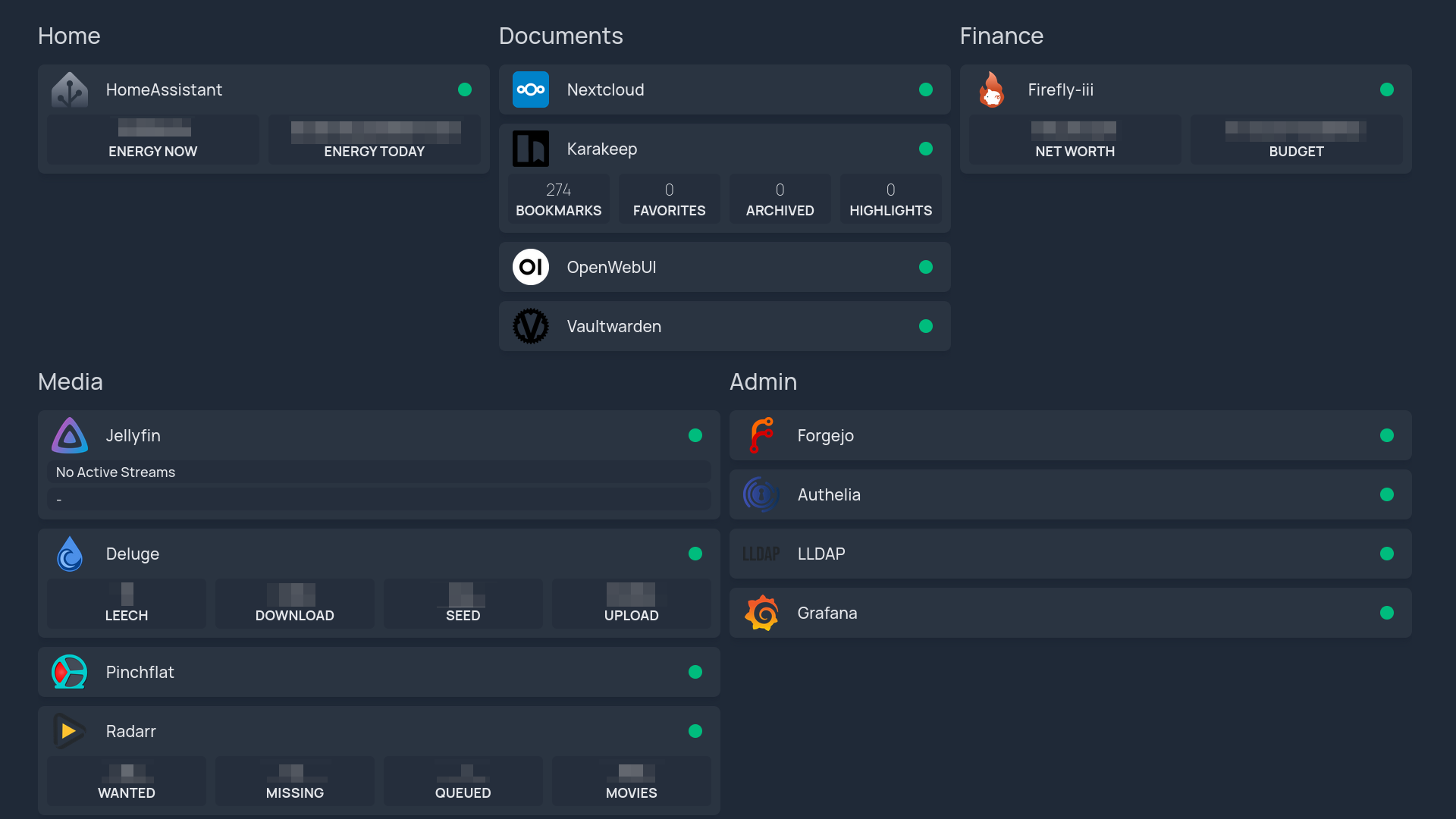
This service sets up Homepage Dashboard which provides a highly customizable homepage Docker and service API integrations.
Features
Declarative SSO login through forward authentication. Only users of the Homepage LDAP user group can access the web UI. This is enforced using the Authelia block which integrates with the LLDAP block.
Access through subdomain using the reverse proxy. It is implemented with the Nginx block.
Access through HTTPS using the reverse proxy. It is implemented with the SSL block.
Integration with secrets contract to set the API key for a widget.
Note
The service does not use state so no backup or impermanence integration is provided.
Usage
The following snippet assumes a few blocks have been setup already:
the secrets block with SOPS,
the
shb.sslblock,the
shb.lldapblock.the
shb.autheliablock.
Note
Part of the configuration is done through the shb.homepage option described here
and the rest is done through the upstream services.homepage-dashboard option.
Main service configuration
This part sets up the web UI and its integration with the other SHB services.
It also creates the various service groups which will hold each service.
The names are arbitrary and you can order them as you wish through the sortOrder option.
{
  shb.certs.certs.letsencrypt.${domain}.extraDomains = [
    "${config.shb.homepage.subdomain}.${config.shb.homepage.domain}"
  ];
  shb.homepage = {
    enable = true;
    subdomain = "home";
    inherit domain;
    ssl = config.shb.certs.certs.letsencrypt.${domain};

    sso = {
      enable = true;
      authEndpoint = "https://${config.shb.authelia.subdomain}.${config.shb.authelia.domain}";
    };

    servicesGroups = {
      Home.sortOrder = 1;
      Documents.sortOrder = 2;
      Finance.sortOrder = 3;
      Media.sortOrder = 4;
      Admin.sortOrder = 5;
    };
  };

  services.homepage-dashboard = {
    settings = {
      statusStyle = "dot";
      disableIndexing = true;
    };

    widgets = [
      {
        datetime = {
          locale = "fr";
          format = {
            dateStyle = "long";
            timeStyle = "long";
          };
        };
      }
    ];
  };
}
The Homepage LDAP user group is created automatically and users can be added declaratively to the group with:.
{
  shb.lldap.ensureUsers.${user}.groups = [
    config.shb.homepage.ldap.userGroup
  ];
}
Display SHB service
A service consumer of the dashboard contract provides a dashboard option that can be used like so:
{
  shb.homepage.servicesGroups.Media.services.Jellyfin = {
    sortOrder = 2;
    dashboard.request = config.shb.jellyfin.dashboard.request;
  };
}
By default:
The
serviceNameoption comes from the attr name, hereJellyfin.The
iconoption comes from applyingtoLoweron the attr name.The
siteMonitoroption is set only ifinternalUrlis set.
They can be overridden by setting them in the [settings](#services-homepage-options-shb.homepage.servicesGroups.name.services.name.settings option) (see option documentation for examples):
{
  shb.homepage.servicesGroups.Media.services.Jellyfin = {
    sortOrder = 2;
    dashboard.request = config.shb.<service>.dashboard.request;
    settings = {
      // custom options here.
    };
  };
}
Secrets can be randomly generated with nix run nixpkgs#openssl -- rand -hex 64.
Display custom service
To display a service that does not provide a dashboard option like in the previous section, set the values of the request manually:
{
  shb.homepage.servicesGroups.Media.services.Jellyfin = {
    sortOrder = 2;
    dashboard.request = {
      externalUrl = "https://jellyfin.example.com";
      internalUrl = "http://127.0.0.1:8081";
    };
  };
}
Add API key for widget
For services supporting a widget,
create an API key through the service’s web UI if available
then store it securely (using SOPS for example) and provide it through the
apiKey option:
{
  shb.homepage.servicesGroups.Media.services.Jellyfin = {
    sortOrder = 1;
    dashboard.request = config.shb.jellyfin.dashboard.request;
    apiKey.result = config.shb.sops.secret."jellyfin/homepageApiKey".result;
  };
  shb.sops.secret."jellyfin/homepageApiKey".request =
    config.shb.homepage.servicesGroups.Media.services.Jellyfin.apiKey.request;
}
Unfortunately creating API keys declaratively is rarely supported by upstream services.
Options Reference
-
shb.homepage.enable -
Whether to enable the SHB homepage service.
Type: boolean
Default:
falseExample:
trueDeclared by:
<selfhostblocks/modules/services/homepage.nix> -
shb.homepage.domain -
Domain under which homepage is served.
<subdomain>.<domain>Type: string
Example:
"domain.com"Declared by:
<selfhostblocks/modules/services/homepage.nix> -
shb.homepage.ldap -
Setup LDAP integration.
Type: submodule
Default:
{ }Declared by:
<selfhostblocks/modules/services/homepage.nix> -
shb.homepage.ldap.userGroup -
Group users must belong to be able to login.
Type: string
Default:
"homepage_user"Declared by:
<selfhostblocks/modules/services/homepage.nix> -
shb.homepage.servicesGroups -
Group of services that should be showed on the dashboard.
Type: attribute set of (submodule)
Default:
{ }Declared by:
<selfhostblocks/modules/services/homepage.nix> -
shb.homepage.servicesGroups.<name>.name -
Display name of the group. Defaults to the attr name.
Type: string
Default:
"‹name›"Declared by:
<selfhostblocks/modules/services/homepage.nix> -
shb.homepage.servicesGroups.<name>.services -
Services that should be showed in the group on the dashboard.
Type: attribute set of (submodule)
Default:
{ }Declared by:
<selfhostblocks/modules/services/homepage.nix> -
shb.homepage.servicesGroups.<name>.services.<name>.apiKey -
API key used to access the service.
This can be used to get data from the service.
Type: null or (submodule)
Default:
nullDeclared by:
<selfhostblocks/modules/services/homepage.nix> -
shb.homepage.servicesGroups.<name>.services.<name>.apiKey.request -
Request part of the secret contract.
Options set by the requester module enforcing some properties the secret should have.
Type: submodule
Default:
""Declared by:
<selfhostblocks/modules/services/homepage.nix> -
shb.homepage.servicesGroups.<name>.services.<name>.apiKey.request.group -
Linux group owning the secret file.
Type: string
Default:
"root"Declared by:
<selfhostblocks/modules/services/homepage.nix> -
shb.homepage.servicesGroups.<name>.services.<name>.apiKey.request.mode -
Mode of the secret file.
Type: string
Default:
"0400"Declared by:
<selfhostblocks/modules/services/homepage.nix> -
shb.homepage.servicesGroups.<name>.services.<name>.apiKey.request.owner -
Linux user owning the secret file.
Type: string
Default:
"root"Declared by:
<selfhostblocks/modules/services/homepage.nix> -
shb.homepage.servicesGroups.<name>.services.<name>.apiKey.request.restartUnits -
Systemd units to restart after the secret is updated.
Type: list of string
Default:
[
  "homepage-dashboard.service"
]
Declared by:
<selfhostblocks/modules/services/homepage.nix> -
shb.homepage.servicesGroups.<name>.services.<name>.apiKey.result -
Result part of the secret contract.
Options set by the provider module that indicates where the secret can be found.
Type: submodule
Default:
{
  path = "/run/secrets/secret";
}
Declared by:
<selfhostblocks/modules/services/homepage.nix> -
shb.homepage.servicesGroups.<name>.services.<name>.apiKey.result.path -
Path to the file containing the secret generated out of band.
This path will exist after deploying to a target host, it is not available through the nix store.
Type: absolute path
Default:
"/run/secrets/secret"Declared by:
<selfhostblocks/modules/services/homepage.nix> -
shb.homepage.servicesGroups.<name>.services.<name>.dashboard -
Provider of the dashboard contract.
By default:
The
serviceNameoption comes from the attr name.The
iconoption comes from applyingtoLoweron the attr name.The
siteMonitoroption is set only ifinternalUrlis set.
Type: submodule
Declared by:
<selfhostblocks/modules/services/homepage.nix> -
shb.homepage.servicesGroups.<name>.services.<name>.dashboard.request -
Request part of the dashboard contract.
Type: submodule
Default:
{ }Declared by:
<selfhostblocks/modules/services/homepage.nix> -
shb.homepage.servicesGroups.<name>.services.<name>.dashboard.request.externalUrl -
URL at which the service can be accessed.
This URL should go through the reverse proxy.
Type: string
Default:
""Example:
"https://jellyfin.example.com"Declared by:
<selfhostblocks/modules/services/homepage.nix> -
shb.homepage.servicesGroups.<name>.services.<name>.dashboard.request.internalUrl -
URL at which the service can be accessed directly.
This URL should bypass the reverse proxy. It can be used for example to ping the service and making sure it is up and running correctly.
Type: null or string
Default:
nullExample:
"http://127.0.0.1:8081"Declared by:
<selfhostblocks/modules/services/homepage.nix> -
shb.homepage.servicesGroups.<name>.services.<name>.dashboard.result -
Result part of the dashboard contract.
No option is provided here.
Type: submodule
Default:
{ }Declared by:
<selfhostblocks/modules/services/homepage.nix> -
shb.homepage.servicesGroups.<name>.services.<name>.name -
Display name of the service. Defaults to the attr name.
Type: string
Default:
"‹name›"Declared by:
<selfhostblocks/modules/services/homepage.nix> -
shb.homepage.servicesGroups.<name>.services.<name>.settings -
Extra options to pass to the homepage service.
Check https://gethomepage.dev/configs/services/#icons if the default icon is not correct.
And check https://gethomepage.dev/widgets if the default widget type is not correct.
Type: attribute set of anything
Default:
{ }Example:
{
  icon = "si-homeassistant";
  widget.type = "firefly";
  widget.custom = [
    {
      template = "{{ states('sensor.total_power', with_unit=True, rounded=True) }}";
      label = "energy now";
    }
    {
      state = "sensor.total_power_today";
      label = "energy today";
    }
  ];
}
Declared by:
<selfhostblocks/modules/services/homepage.nix> -
shb.homepage.servicesGroups.<name>.services.<name>.sortOrder -
Order in which groups will be shown.
The rules are:
Lowest number is shown first.
Two groups having the same number are shown in a consistent (same across multiple deploys) but undefined order.
Default is null which means at the end.
Type: null or signed integer
Default:
nullDeclared by:
<selfhostblocks/modules/services/homepage.nix> -
shb.homepage.servicesGroups.<name>.sortOrder -
Order in which groups will be shown.
The rules are:
Lowest number is shown first.
Two groups having the same number are shown in a consistent (same across multiple deploys) but undefined order.
Default is null which means at the end.
Type: null or signed integer
Default:
nullDeclared by:
<selfhostblocks/modules/services/homepage.nix> -
shb.homepage.ssl -
Path to SSL files
Type: null or (open submodule of anything)
Default:
nullDeclared by:
<selfhostblocks/modules/services/homepage.nix> -
shb.homepage.ssl.paths -
Paths where the files for the certificate will be located.
This option is the contract output of the
shb.certs.certsSSL block.Type: open submodule of anything
Declared by:
<selfhostblocks/modules/services/homepage.nix> -
shb.homepage.ssl.paths.cert -
Path to the cert file.
Type: absolute path
Declared by:
<selfhostblocks/modules/services/homepage.nix> -
shb.homepage.ssl.paths.key -
Path to the key file.
Type: absolute path
Declared by:
<selfhostblocks/modules/services/homepage.nix> -
shb.homepage.ssl.systemdService -
Systemd oneshot service used to generate the certificate. Ends with the
.servicesuffix.Use this if downstream services must wait for the certificates to be generated before starting.
Type: string
Example:
"cert-generator.service"Declared by:
<selfhostblocks/modules/services/homepage.nix> -
shb.homepage.sso -
Setup SSO integration.
Type: submodule
Default:
{ }Declared by:
<selfhostblocks/modules/services/homepage.nix> -
shb.homepage.sso.enable -
Whether to enable SSO integration…
Type: boolean
Default:
falseExample:
trueDeclared by:
<selfhostblocks/modules/services/homepage.nix> -
shb.homepage.sso.authEndpoint -
Endpoint to the SSO provider.
Type: string
Example:
"https://authelia.example.com"Declared by:
<selfhostblocks/modules/services/homepage.nix> -
shb.homepage.sso.authorization_policy -
Require one factor (password) or two factor (device) authentication.
Type: one of “one_factor”, “two_factor”
Default:
"one_factor"Declared by:
<selfhostblocks/modules/services/homepage.nix> -
shb.homepage.subdomain -
Subdomain under which homepage will be served.
<subdomain>.<domain>Type: string
Example:
"homepage"Declared by:
<selfhostblocks/modules/services/homepage.nix>